TABATA1.2.2
Publisher Description
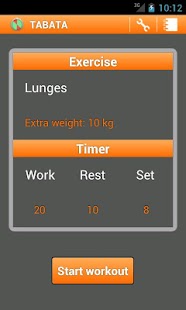
Tabata intervals is a very effective and popular exercise method. It has during decades proven to be one of the most effective high intensity interval training, HIIT, schemes. This app is pre-set to use the classical tabata intervals (20 sec work and 10 sec rest, repeat 8 times) but can easily be customized to include all possible intervals training. For example it is superb training guide to CrossFit, TRX, Sprint-training, Kettlebells, etc.
The TABATA app is an excellent replacement for your Gymboss® timer.
Easy and powerful. Only 3 steps to get you going:
1. Choose your workout or add your own.
2. Choose the interval length, rest length and the number of working sets.
3. Push start and enjoy!
The workout can be saved into a diary so you can go back and see your progress.
The last workout setup is saved so if you want to run the same interval training as the last time. You are only 1 touch away!
You get your Tabata score by taking the minimum number of repetitions you did in all of the sets in the workout.
FACEBOOK is activated and it is possible to publish your score to your wall and challenge your friends, or to just show off.
About TABATA
The company that develops TABATA is Androiders. The latest version released by its developer is 1.2.2. This app was rated by 1 users of our site and has an average rating of 3.0.
To install TABATA on your Android device, just click the green Continue To App button above to start the installation process. The app is listed on our website since 2012-04-06 and was downloaded 17 times. We have already checked if the download link is safe, however for your own protection we recommend that you scan the downloaded app with your antivirus. Your antivirus may detect the TABATA as malware as malware if the download link to com.toband.tabata is broken.
How to install TABATA on your Android device:
- Click on the Continue To App button on our website. This will redirect you to Google Play.
- Once the TABATA is shown in the Google Play listing of your Android device, you can start its download and installation. Tap on the Install button located below the search bar and to the right of the app icon.
- A pop-up window with the permissions required by TABATA will be shown. Click on Accept to continue the process.
- TABATA will be downloaded onto your device, displaying a progress. Once the download completes, the installation will start and you'll get a notification after the installation is finished.
Program Details
System requirements
Download information
Pricing
Version History
version 1.2.2
posted on 2012-04-06
Several fixes and updates
version 1.2.2
posted on 2012-04-06
v1.2.2,✔ Different sound when it is time to do the last set.,✔ Fixed issue with weight unit switched from lb to kg when adding new exercise.,v1.2.0,✔ Screen is always kept on during workout.,✔ The timer auto-pauses when the app is put in the background, for instance when an incoming call occur.,✔ Russian and German translation thanks to ihoru and Lewe.
